PHP2Shell: the flaw that took cities offline. And why your hosting provider decides whether you were affected
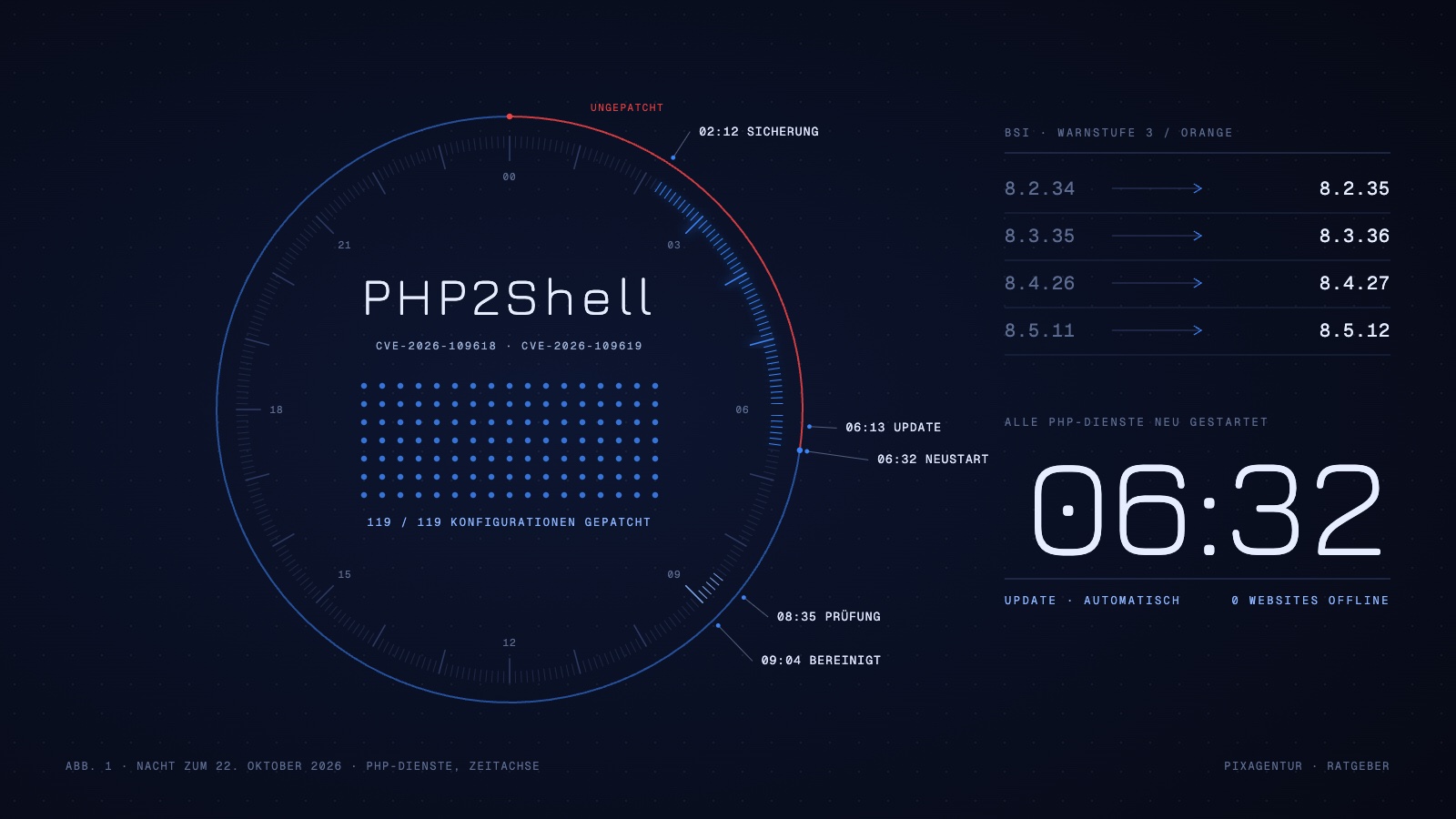
In the night to 22 October 2026, city halls, hospitals and transit operators took their websites offline. Not because of an attack, but out of caution: two flaws in the core of PHP let an attacker run foreign code on a web server, remotely and without logging in. PHP sits underneath WordPress, underneath almost every shop and underneath most company websites. If you run a site like that, there was nothing you could do that night. The work fell to your hosting provider. And that is exactly how you tell whether you have a good one.
What happened this week
The two vulnerabilities carry the IDs CVE-2026-109618 and CVE-2026-109619. The security industry calls them “PHP2Shell” together. Two security firms found them, Huntress among them, and reported them privately to the PHP team. That is how it normally works: the developers build a fix in peace, update and warning go out on the same day, and attackers only hear about the flaw once the solution exists.
Not this time. On Tuesday, 20 October, the details leaked online a day before the planned update. Attackers knew the flaw before a fix existed. Germany's Federal Office for Information Security (BSI) rated the situation 3 out of 4, “orange”, meaning extraordinarily high. Its advice in this situation is uncomfortable: if you do not want to carry the risk, take your PHP servers off the network until the update is installed.
Many did exactly that. Mainz shut down its central web portal and several city services, Potsdam and Halberstadt their city sites, Berlin's Charité university hospital its official website. In Hanover, the transit company Üstra took its site offline, with effects reaching into ticket sales in the app. In the Netherlands, the national cyber security centre, the port of Rotterdam and the football association were unreachable, and further shutdowns followed in Denmark, Finland and Japan.
On Wednesday afternoon, 21 October, the PHP project released the fixed versions. Since then a race has been running worldwide: hosting providers and administrators roll out updates, attackers build tools that exploit the flaw automatically. Heise Security expected working malware within hours to days. The BSI expects the wave of attacks to last for weeks and months.
What the flaw can do
Both bugs sit in the memory and state handling of web requests, the place where PHP receives every single request from a visitor. An attacker sends a crafted request, and the server then runs code the attacker sent along. Experts call this remote code execution. On the CVSS severity scale the flaw scores 9.2 out of 10.
In practice: whoever exploits it can take over a website completely. They can read out the database with customer data, orders and passwords, change files, plant malicious code for visitors or use the server as a stepping stone for further attacks. It needs no password and no access. It is enough that the website is reachable and runs a vulnerable PHP version.
| PHP branch | Vulnerable | Fixed in |
|---|---|---|
| PHP 8.5 | up to 8.5.11 | 8.5.12 |
| PHP 8.4 | up to 8.4.26 | 8.4.27 |
| PHP 8.3 | up to 8.3.35 | 8.3.36 |
| PHP 8.2 | up to 8.2.34 | 8.2.35 |
| PHP 8.1 and older | yes | no official update anymore |
The last row is the worst one. For PHP 8.1, 8.0 and 7.4 the PHP project no longer ships ready-made updates, because those branches reached end of life long ago. Anyone still running them depends on backports from their hosting provider or Linux distribution. If there are none, the only options are to shut down or isolate. The BSI says this just as plainly.
One more thing worth knowing: some configuration changes reduce the risk, for example switching off individual PHP functions. The PHP project itself names them only as a stopgap. A web firewall that catches suspicious requests does not replace the patch either. It buys time, nothing more. The only complete fix is the update.
Why you cannot fix this yourself as a site owner
This is the point many reports miss. If you run a WordPress site, a shop or a portal, you maintain the system and its extensions. PHP sits one floor below. It belongs to the server, not to the website. With a typical web hosting plan, the kind most businesses have, you cannot reach that floor at all. In your customer menu you can perhaps choose between PHP 8.2 and 8.3. Which minor version sits behind that choice, and whether it is patched, is up to the host alone.
That is why this week produced three kinds of websites:
- Websites at large mass hosts. According to Tagesschau, providers like IONOS updated the PHP versions in their systems centrally. Anyone with a standard plan and automatic updates was protected after a few hours without noticing.
- Websites on own or rented servers. Here someone has to install the update by hand and restart the PHP processes. These are the cases where cities and hospitals preferred to take their sites offline until the administrators were done. Not out of panic, but because at eleven at night nobody was left in the building who could do it.
- Websites nobody is responsible for. The server was set up years ago by an agency that no longer exists. Or the plan at the cheap host still runs PHP 7.4 because nobody ever switched it. These websites are vulnerable today and stay that way until someone takes care of them. For attackers they are the easiest prey, because their tools scan the network automatically for exactly such versions.
As a site owner you can do one thing in this situation: ask. And you should do it today, not next week.
What happened on our servers that night
We host customer websites on our own servers in Germany, managed through Plesk. We lay out how the night went for us, because that is exactly the question you should put to every hosting provider.
- 21 October, morning. Plesk builds the fixed PHP packages for all four branches running on our servers: 8.2, 8.3, 8.4 and 8.5. This happens on the same day the PHP project publishes the fix.
- 22 October, 02:12. The daily server backup runs as every night. If something goes wrong later, there is a state from before the update.
- 22 October, 06:13 to 06:32. The automatic security update installs the new PHP packages and the matching Plesk update. At 06:32 all four PHP services restart. This restart matters: an update on disk protects nothing as long as the old processes keep running in memory.
- 22 October, 08:35 to 08:47. Manual check. All 119 active website configurations on the server run on the patched versions. We request eight public websites from outside as a spot check, and all answer with the new PHP version in the header. The error logs of the last three days show no traces of an attack. We do find five old PHP processes, three internal test servers and two cron jobs that were still running on the old state in memory. None of them was reachable from outside.
- 22 October, 09:04. The five old processes are ended. Then a second spot check: all checked websites respond normally.
Not a single customer website was offline during this time. Most customers learned about the flaw from the news and not from us, because there was nothing for them to do. That is the state managed hosting is supposed to deliver.
To be honest about it: between the leak on Tuesday and our update on Thursday morning lay about a day and a half in which the old versions were running. We found no traces of an attack in that window. But a log check is not a forensic investigation, and anyone claiming otherwise promises too much. That is exactly why we keep the backups from before that period.
Rather not think about PHP versions at night?
Then let us look after your server. Security updates run automatically, backups run daily, and you get a report every month. We move your existing website for you.
How to recognize a host that catches this
The night showed which properties of a hosting setup count in an emergency. None of them is on the price tag.
Security updates run automatically, even at night
The patch came out on a Wednesday afternoon. On our side it was installed by half past six on Thursday morning, without anyone having to get up. A host that lets updates wait for the next maintenance window loses days in a situation like this. And days are too many here.
Only PHP branches that are still maintained run
Nothing on our servers runs below PHP 8.2. That is no coincidence but a rule: as soon as a branch drops out of maintenance, we move the websites to the next one. PHP 8.2 reaches end of life on 31 December 2026, and the affected websites are already on our list. Anyone who still offers you PHP 7.4 today had no solution for you this week.
After the update comes a restart and a re-check
Installing the update is half the work. The processes have to restart, and then someone has to check whether everything really runs on the new state. Our check found five old processes the automatic update had missed. Without the re-check they would have kept running.
A backup exists before the update
Daily backups are standard in our plans, and that night the backup ran four hours before the update. If a patch breaks an application, which happens, the way back is short.
Attackers are slowed down before they reach the door
Automated scanners comb the network for vulnerable versions and send hundreds of requests per minute. On our servers an intrusion blocker bans such addresses for an hour after a series of failed attempts, and repeat offenders for longer. As said, this does not replace a patch. But it makes a server uninteresting for mass attacks.
Someone tells you what happened
The difference between a hosting provider and a landlord of disk space shows in whether you get a report after a week like this. Our care plan customers receive a monthly maintenance report in which such incidents are listed with time and action. This article is the public version of it.
Six questions for your host
If you are not sure how your hosting got through this week, send a short email to your provider. These six questions are enough:
- Which PHP version does my website run on today, with the full version number?
- When were the updates against CVE-2026-109618 and CVE-2026-109619 installed?
- Were the PHP processes restarted afterwards?
- Do you offer PHP versions that no longer get security updates, and does my website run on one of them?
- Is there a backup from the state before the update, and how long is it kept?
- Were the logs checked for traces of an attack?
A good host answers within a day, with numbers. A host that dodges, talks in general terms about “the highest security standards” or does not answer at all has given you an answer too.
What is still left to do
The wave is not over. In the coming weeks attackers will scan the network for everything that is still vulnerable, and they will find plenty, because many websites have nobody who looks after them. Three things belong on your list:
First: find out the PHP version of your website, using the questions above. If the answer is “7.4” or “8.1”, a move or a version switch is no longer a matter of comfort but overdue.
Second: do not confuse PHP updates with updates of your website. WordPress, plugins and themes have flaws of their own, and the PHP patch does not close those. Both need care, on different levels, often by different people. Having both from one source saves you the question of who is responsible right now.
Third: if your website suddenly got slower in the last few days, unknown files appear or visitors are redirected to foreign sites, do not wait. Those are the typical signs of a taken-over website. For this case there is our emergency help, where we secure the traces, lock the attacker out and close the hole.
Come to us. We keep watch over your server.
Hosting on servers in Germany, security updates within hours instead of weeks, daily backups and a monthly maintenance report. Moving your existing website is included at no extra cost.
Frequently asked questions
Is my WordPress website affected by the PHP flaw?
It does not depend on WordPress but on the PHP version of your server. Every version below 8.2.35, 8.3.36, 8.4.27 and 8.5.12 is vulnerable, and so is every version 8.1 or older. You can find out which version runs in your hosting provider’s customer menu or by asking. An up-to-date WordPress alone does not protect you, because the flaw sits one floor deeper.
Can I install the PHP update myself?
Not with a normal web hosting plan. PHP belongs to the server, and the host manages that. At most you can switch to a newer PHP branch in the customer menu, say from 8.1 to 8.3, and hope the host has patched that branch. With your own server or vServer, you or your administrator must install the update yourselves and then restart the PHP services.
Is a web firewall enough protection against PHP2Shell?
No. A web firewall can catch known attack patterns and buy time, but attackers adapt their requests. The PHP project names configuration changes only as a stopgap as well. The only complete fix is the update to a fixed PHP version, followed by a restart of the PHP processes.
How do I tell that my website has already been hacked?
Typical signs are unknown files in the web directory, visitors redirected to foreign sites, suddenly high server load, warnings from Google or the browser, and emails sent from your domain that you did not write. In that case: delete nothing, have the logs secured and get someone with experience in compromised servers right away.
What happens to websites on PHP 7.4 or 8.1?
For these branches the PHP project no longer ships ready-made updates. Some Linux distributions and hosting providers backport fixes, many do not. Ask your host explicitly whether your branch was patched. If the answer is no or stays silent, the website should move to a maintained branch before it keeps running.