Cockpit feature · Marketing
Online Booking — Requests Instead of Phone Tag
Customers pick a service, a desired date and a time window on a public page that links in anywhere: on the website, in the email signature, or turned into your own QR code. The request lands straight in the office's intake inbox, including a confirmation email to the customer and spam protection against automated floods.
Add-on · €9.99/mo — included in Premium
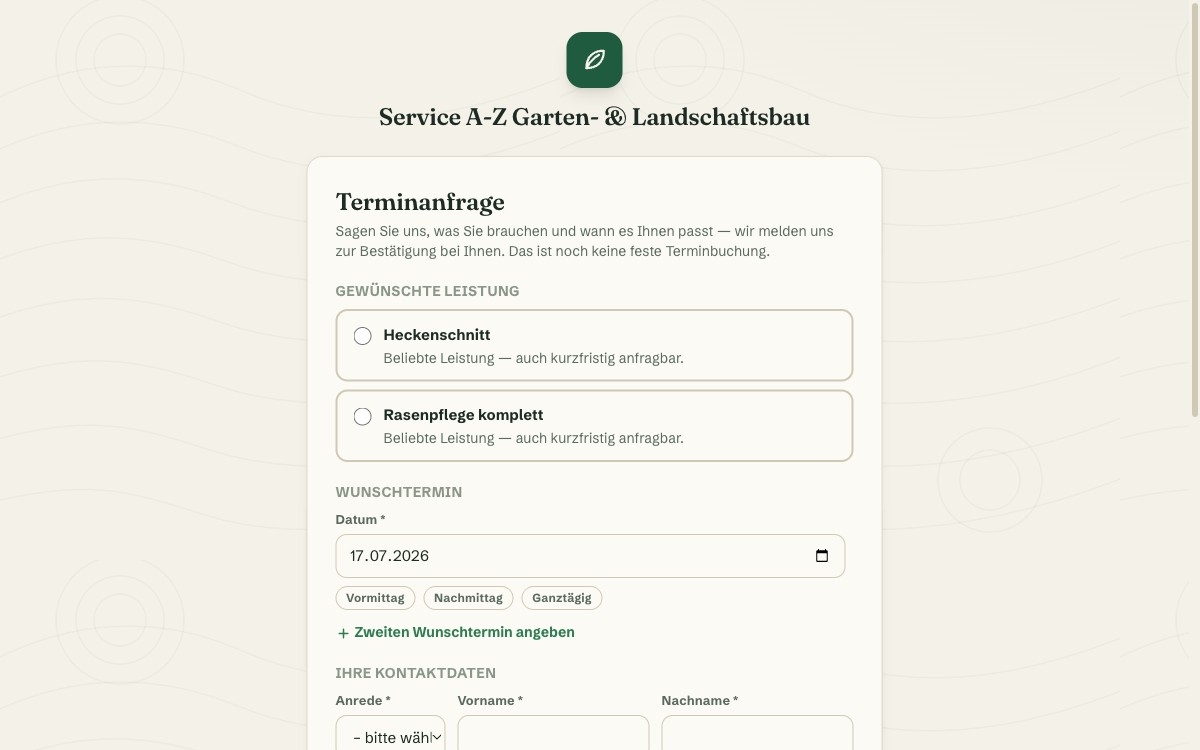
A customer wants an appointment, calls, hits voicemail, calls again the next day. Every missed call costs time on both sides. Online booking sets up a public page for this, with no login required: the customer picks from the services you've marked as bookable, a desired date and a time window (morning, afternoon or all day), optionally even a second desired date as a backup.
Important: this is a request, not a fixed booking. There are no calendar slots the customer claims in real time. Instead, every request lands as an ordinary draft in the existing intake inbox, clearly marked with a 🌐 badge, and your office gets an instant notification. When converting it into a real appointment, the same conflict check applies as for any other intake: crew already booked, equipment double-booked, employee on vacation. Double bookings don't happen, because a person in the office confirms every request before it becomes a real appointment.
An invisible honeypot field and a limit of three requests per IP address per hour protect against automated abuse, with Cloudflare Turnstile as an optional extra layer. If the customer left an email address, they get an instant confirmation that the request arrived. The page itself can be linked wherever customers look for an appointment. The Cockpit gives you the URL to copy straight from the settings, and turning it into your own QR code takes seconds with any common generator.
Straight in the Intake Inbox: A 🌐 Badge and Desired Dates
Every online request shows up as an ordinary draft in the project intake, clearly marked with a 🌐 "online request" badge, including both desired dates and time windows the customer specified.
From there, everything continues exactly like any other intake: the conversion dialog checks live for conflicts (crew already booked, equipment double-booked, employee on vacation) before the request becomes a real appointment.
More about On-Site Project Capture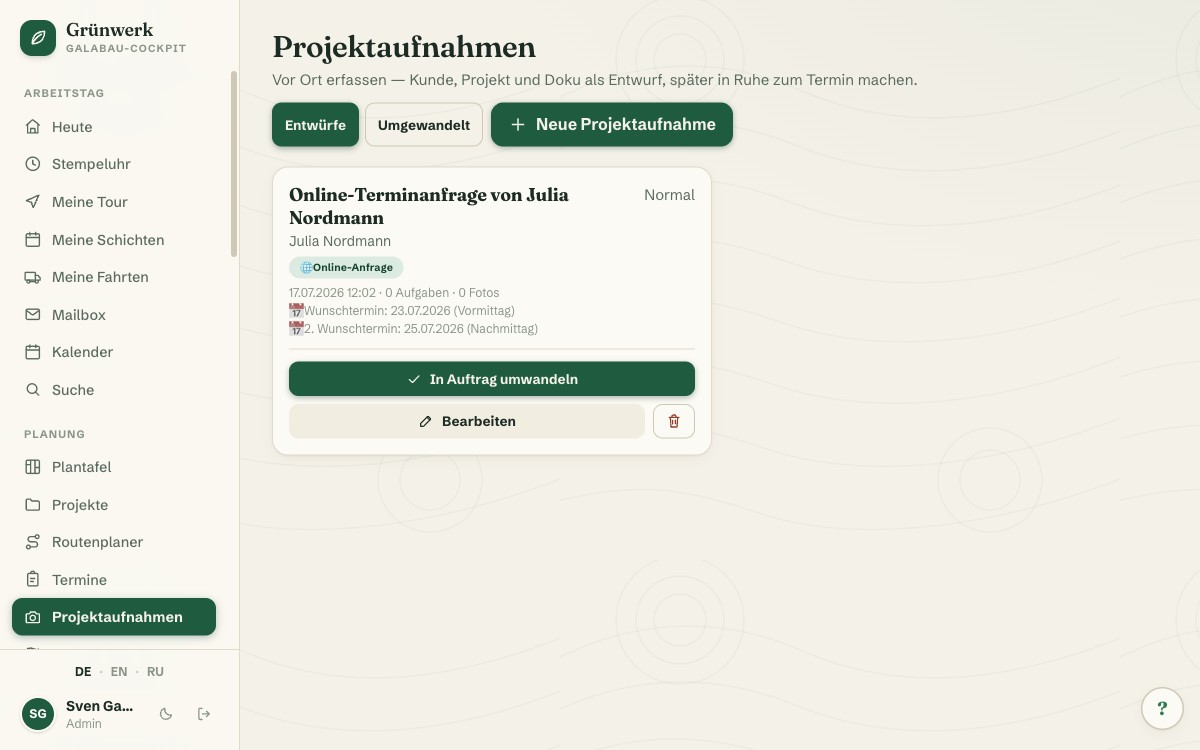
An Honest Thank-You Page, on Mobile Just as on Desktop
After submitting, the customer immediately sees a confirmation: the request has arrived; the office will get in touch to confirm. No false promise of a fixed appointment that doesn't actually exist yet at this point.
The whole page is deliberately kept lean and just as fast on mobile as at a desk. Most requests come from a phone anyway, right after tapping the link in an email signature or a QR code.
See it live in the demo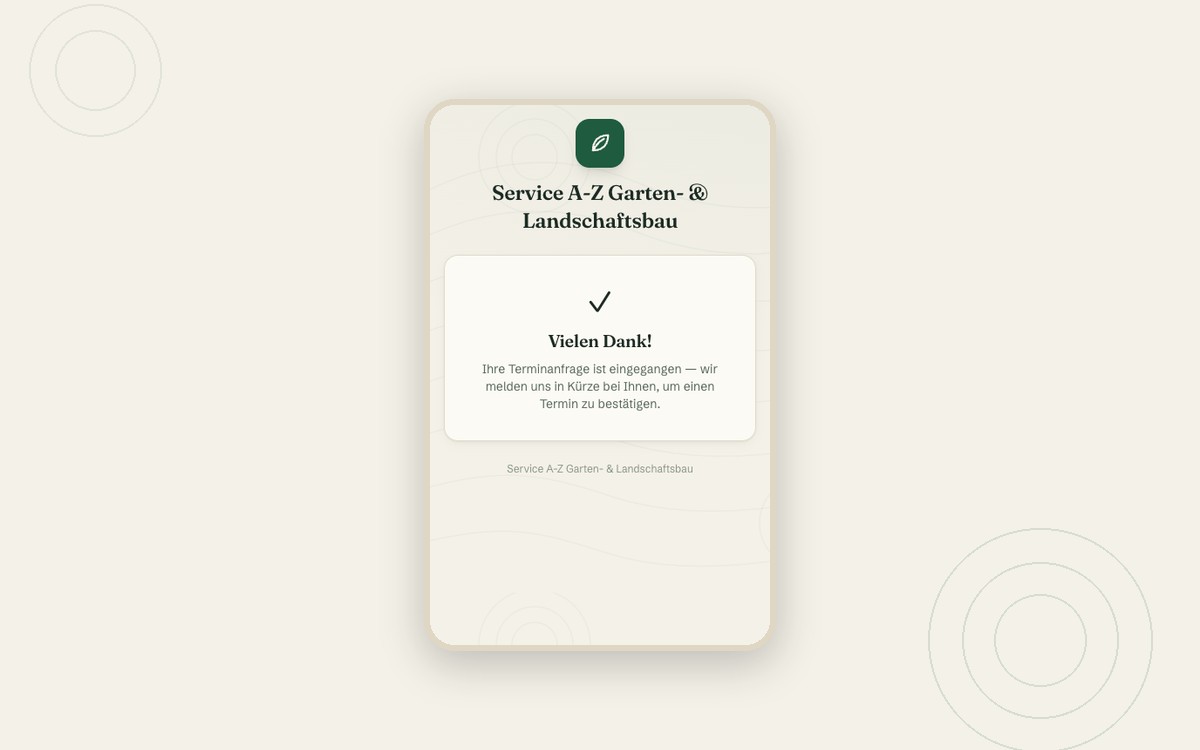
What it does
- Public page with no login, linkable via URL (turn it into your own QR code with any generator)
- Only services you've marked as bookable are shown
- Desired date with time window (morning/afternoon/all day)
- Optional second desired date as a backup
- Lands as a draft in the existing intake inbox, marked with a 🌐 badge
- Instant notification to the office on every new request
- Confirmation email to the customer, if an address was provided
- Live conflict check when converting into an appointment (crew, equipment, vacation)
- Request-based, not real-time slots — no double bookings possible
- Honeypot field + IP rate limit against spam, Cloudflare Turnstile optional
Discover more features
Included in these trade solutions
Ready-to-run trade systems built on this feature.
Try it yourself — no registration
Every trade has its own live demo with sample data. Or pick your package right away: the whole team is included.