Cockpit feature · Fleet
Trip Log — Documented Without Gaps, Without GPS Tracking
Log trips manually from your phone: the start mileage is already prefilled; the purpose (business, private, commute) is one tap away. If a stretch of road is missing between two trips, the Cockpit warns you. Monthly reports as CSV or PDF, every later correction stays on record.
Add-on · €9.99/mo — included in Premium
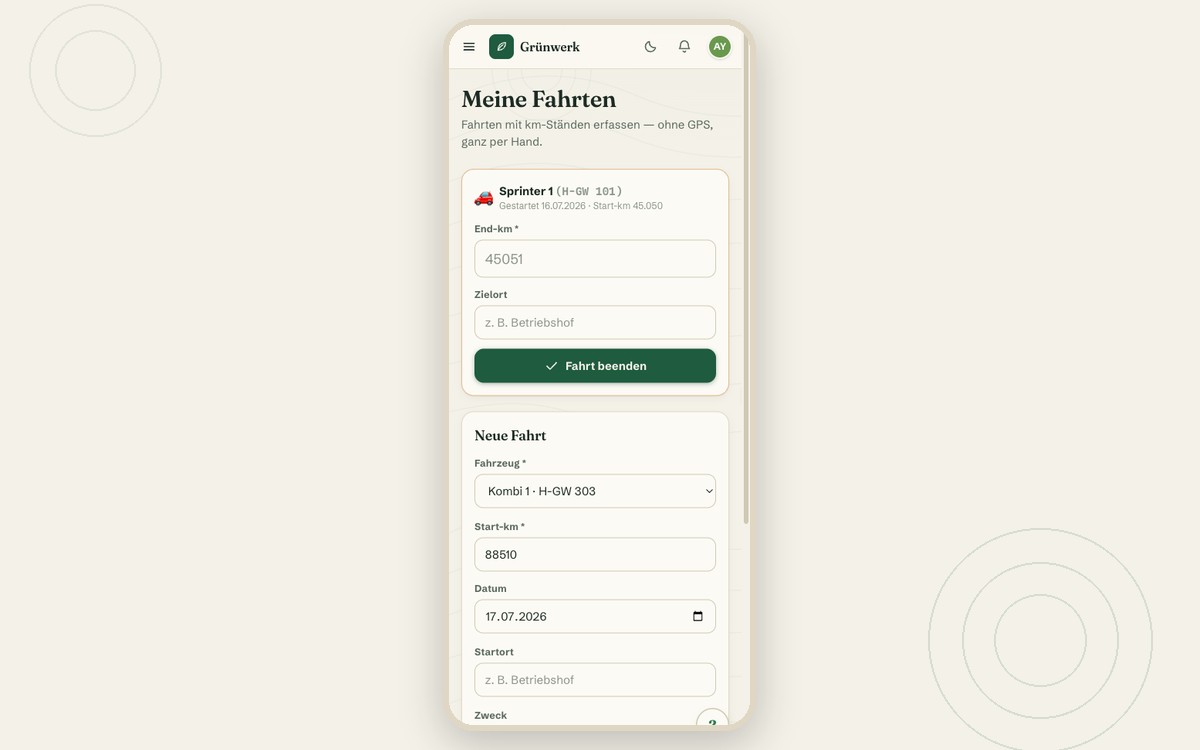
GPS tracking in the company vehicle sounds like the more convenient option, but it comes with co-determination obligations and an uneasy feeling on the team the moment the private detour to the bakery gets logged too. The trip log deliberately takes the other path: no location tracking, no GPS column in the database at all. Every trip is logged by the employee actually driving, with start and end mileage plus start and end location as free text.
Starting a new trip takes seconds on the phone: pick the vehicle (the start mileage is already prefilled with the last recorded end reading), tap the purpose as a chip (business, private or commute), done. If the entered start mileage doesn't match the last end reading, the Cockpit points out the gap, but never blocks anything. Sometimes a reading simply gets forgotten, and reality beats form discipline. At the end of the day, one tap on "Finish trip", enter the end mileage and destination, done.
The office sees every trip filtered by vehicle and month, including that same gap warning as a highlighted row in the table, and exports the month as CSV or as a landscape PDF for the tax records. Corrections made by the office, say a wrong location or a mistyped mileage reading, are logged in the change history too. Honestly: the tax office's requirements for a proper trip log (timely, gapless, unalterable) are your business's own responsibility. The Cockpit records the trips cleanly, but it doesn't replace an official certification.
The Office View: Every Trip, Filtered, With a Gap Warning Row
The office sees every logged trip in a table, filtered by vehicle and month, including driver, distance, purpose and an optional customer assignment. If a stretch of kilometres is missing between two trips, a clear warning row shows up right in the table.
From here, any trip can be corrected or deleted. Both are logged automatically in the change history. And anyone who wants to know which vehicle is currently used for what finds the answer right in its matching vehicle file.
More about Fleet — Never Miss a TÜV, Service or Lease Deadline Again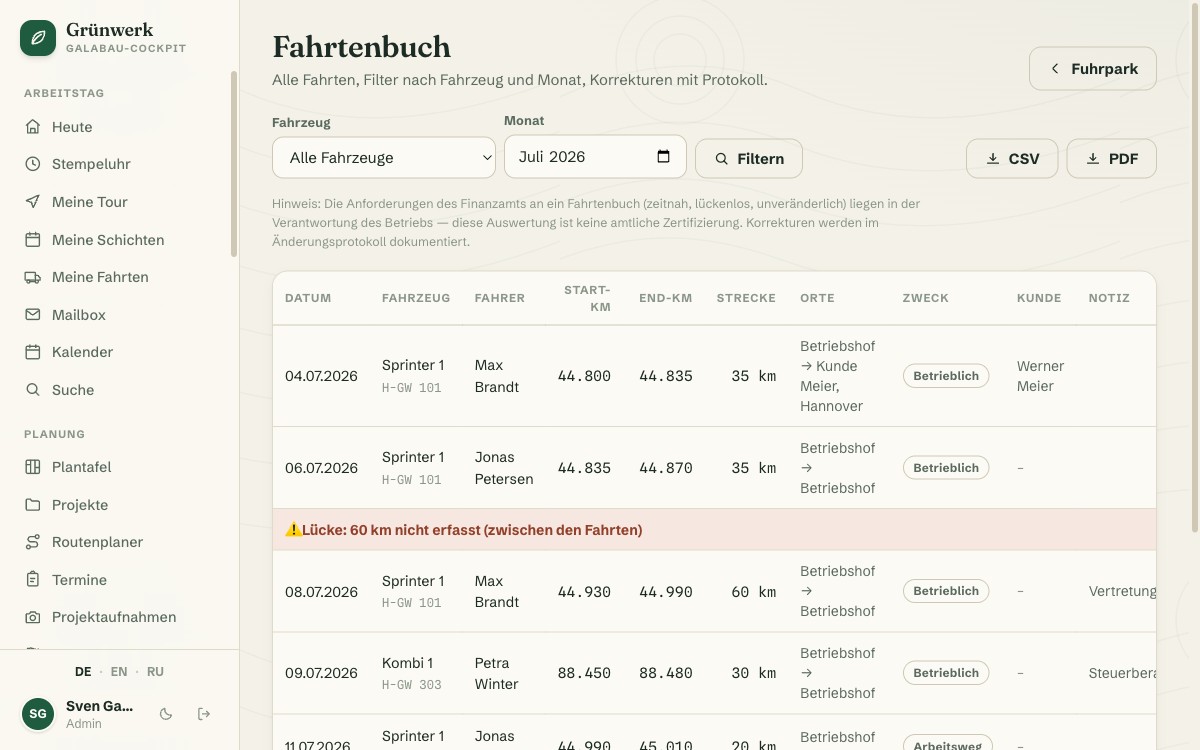
Monthly Report as CSV or Landscape PDF
One click exports the selected month and vehicle as a CSV for further processing, or as a landscape PDF, with every column a trip log needs: date, mileage readings, distance, locations, purpose and note.
That keeps the full monthly overview ready at hand for your own records, as a supporting report, not a substitute for your own diligence in logging trips promptly.
See it live in the demo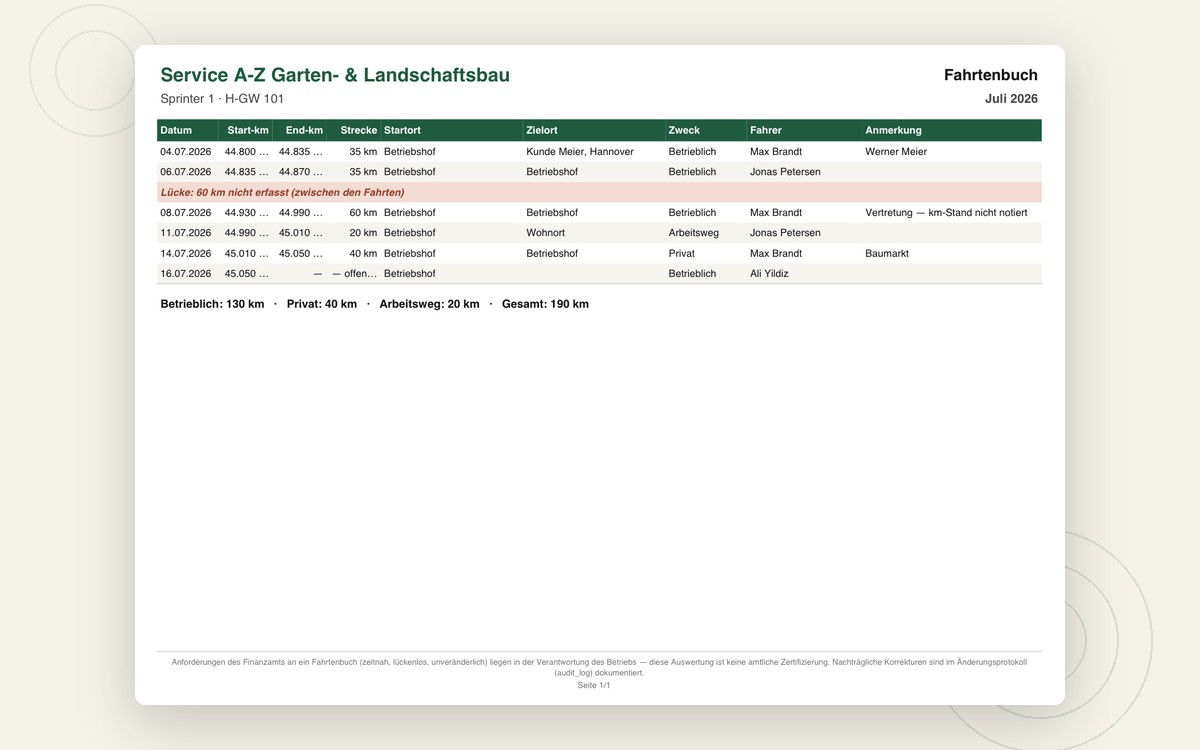
What it does
- Manual entry from the phone — start mileage prefilled automatically
- Deliberately no GPS/tracking — free-text locations only, no location data
- Purpose as a chip: business, private, commute
- Mileage-gap warning between two trips, but never blocks anything
- Exactly one open trip per vehicle — the start reading stays protected
- Optional customer and appointment assignment per trip
- "My trips" with the last 14 days for life on the road
- Office view with filter by vehicle and month
- CSV and landscape PDF export for the tax records
- Office corrections logged in the change history
- Honest disclaimer: GoBD requirements remain the business's own responsibility
Discover more features
Included in these trade solutions
Ready-to-run trade systems built on this feature.
Try it yourself — no registration
Every trade has its own live demo with sample data. Or pick your package right away: the whole team is included.